For freelancers · JDG

Run your JDG, not a pile of receipts.

You paid for 27 things this month. Where are the 27 invoices? GitHub, AWS, Adobe, Meta Ads, a coworking desk: the documents are spread over email, portals and your phone. Komplet imports your bank statement, finds the document behind each payment and shows the ones still missing, so month-end becomes a check, not a hunt.

FreeMac onlyEnglish and Polish

At month-end
  • My accountant keeps asking for documents I can’t find.the missing ones, in amber
  • Where is the AWS invoice from March?filed under 2026 › 03
  • What does my accountant still need?one ZIP, ready
Sound familiar?

Four ways a month goes missing.

“My accountant keeps asking me for documents I can’t find.”
IT contractor on B2BGitHub, AWS, OpenAI, JetBrains, Adobe: import the statement, see which subscriptions have no invoice yet, add those, and send one clean package.
“Money in, money out, invoices sent, documents missing. Done.”
Designer or creativeThe month on one page, in plain words, in an app that does not look like accounting software.
“Meta Ads, Google Ads, Canva… the documents come from everywhere.”
Marketing freelancerDrop each one in as it arrives, in English or Polish, in euros or dollars. Komplet files it in the right month and shows it in złoty too.
“What is KSeF? Can I deduct this? What does my accountant need?”
First year in businessFree to start, with guides written for exactly these questions.
What gets easier

The monthly routine, made lighter.

Everything below is in the free app, working today.

Bank statement

Every payment finds its document.

Add the month’s bank statement as a PDF. Komplet pairs each payment with the invoice that explains it, by invoice number, amount, NIP and seller, even a dollar invoice you paid by card in złoty. Whatever still has no document shows in amber: 24 payments, 21 documents found, 3 missing.

  • PDF statements from any bank, in Polish or English
  • Link a payment by hand when you know better
  • Bank fees and tax transfers need no document
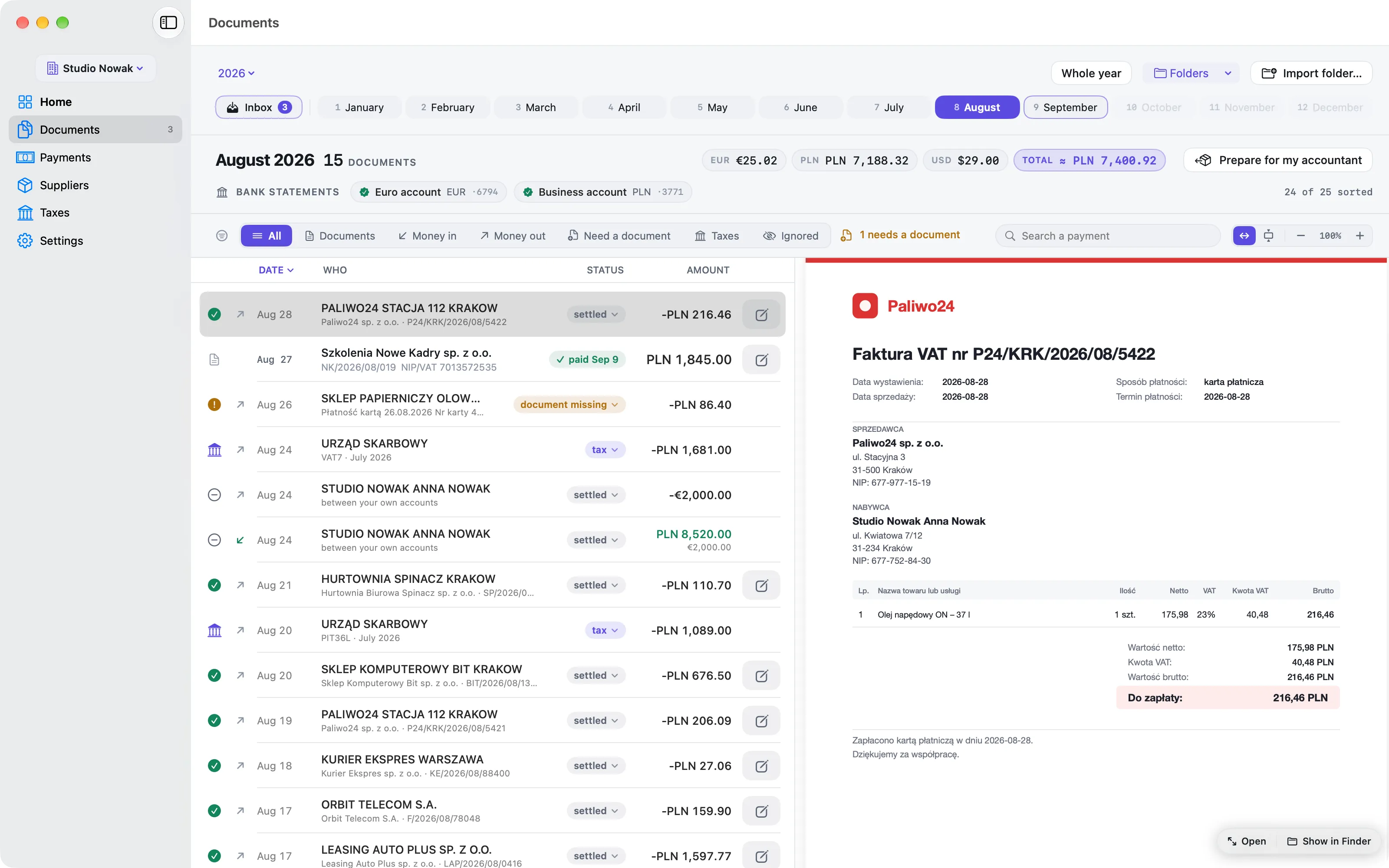
A month in Komplet: payments and documents in one list, with the statement for each bank account on top.
Inbox

Read, not retyped.

Drop an invoice or a receipt on the Komplet icon in the menu bar. It reads the seller, NIP, number, date, amount and currency, from the PDF or from a photo, on your Mac, and files it in your own folders by month.

  • English and Polish documents
  • After the first invoice, it knows the supplier
Tax and ZUS

Paid, and when.

Transfers to your tax micro-account and to ZUS are read from your statement and grouped by tax and period. Your deadlines already skip weekends and Polish holidays.

  • Late only when a statement proves it
  • Interest kept apart from the tax
Accountant or not

Ready for whoever does the books.

“Prepare for my accountant” builds a folder and a ZIP: every document under a readable name, the statements, and a summary as PDF and spreadsheet. Doing your own books? It is the same tidy month, for you.

  • Send it by Mail, or share a link from iCloud Drive
Also in the free app
  • Suppliers ranked by spend
  • Euro and dollar amounts in ≈ zł
  • To-dos with their documents
  • Light and dark
How it works →
Guides

Worth reading next.

Short, practical articles for people who run a one-person business in Poland.

All articles on Sole traders (JDG) →

Free

for managing your paperwork, with everything on this page.

Connect · 29 zł a month, VAT included, when you want Komplet to connect to KSeF and inFakt, and automate more. wFirma is coming.

See pricing →
Questions

What people ask before they start.

Something else? Write to us.

Most of my costs are subscriptions billed in dollars. Does that work?
Yes. Komplet reads English invoices from GitHub, AWS, OpenAI, JetBrains, Adobe and the like as easily as Polish ones, pairs them with the card payment in złoty, and shows ≈ zł under every foreign amount at the NBP rate.
Does Komplet work with ryczałt, liniowy and skala?
Yes. Komplet keeps your documents and payments in order, which is the same work whichever tax form you chose. It does not calculate your tax. Our guides explain the three forms.
I do my own books. Is Komplet still useful?
Yes. Every document is filed by month, every payment is checked against your statement, and your tax and ZUS transfers are in one place. Komplet does not keep the books or file returns; it keeps what you need to do them.
My accountant already has a system. Why add Komplet?
Your accountant does the accounting. Komplet gets everything ready: collecting, naming and checking your documents against your bank statement, then handing over one folder and one ZIP a month.
Can I send invoices to my clients from Komplet?
Yes. Invoicing is in the free app: create your invoice and send it to your client. Komplet also looks after the documents you receive and pay for.
Is it really free?
Yes. Managing your paperwork is free: everything on this page costs nothing. You pay (Connect, 29 zł a month, VAT included) only when you want Komplet to connect to KSeF and your accounting platform, and automate more. See pricing.
Does it work on Windows, the web or my phone?
No. Komplet is a Mac app. There is no Windows, web or phone version.

Make month-end a short check.

Import your statement, drop in your documents, and see what is still missing before your accountant asks. Free, for your Mac.

Mac only